Background removal
Tools1 min read
A one-click tool: upload an image, get the subject without a background. No prompt needed.
Open: Upscale · Remove Background
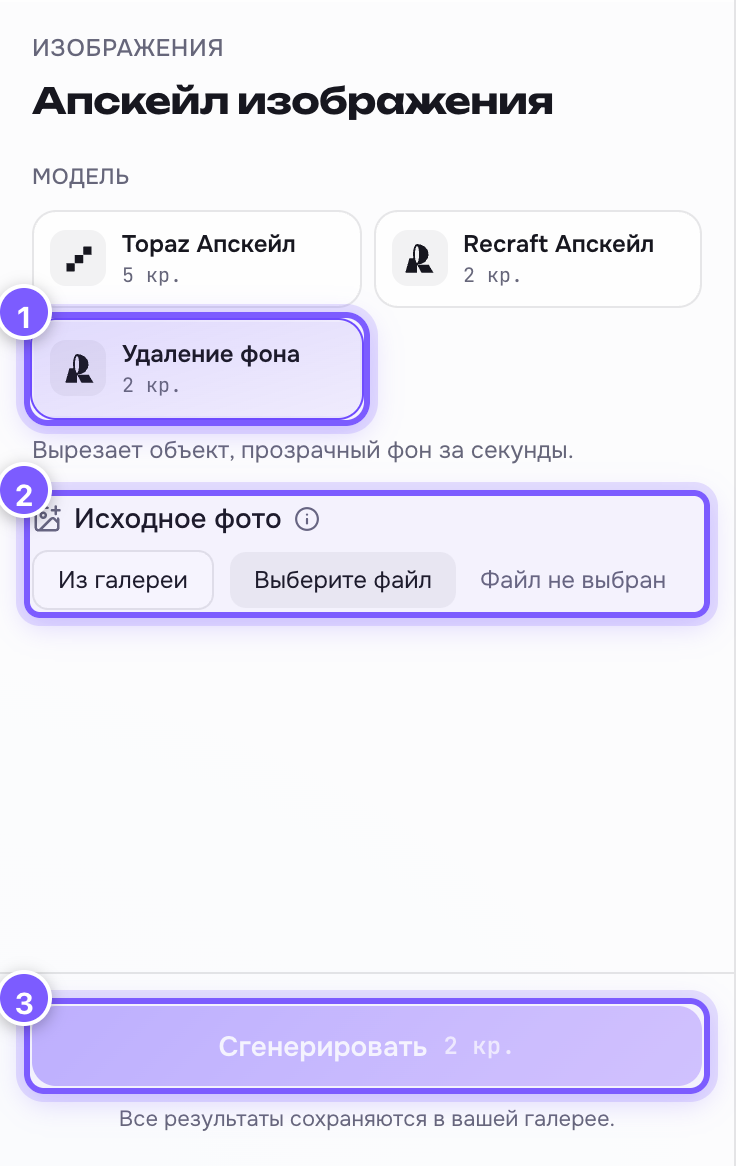
- The "Background removal" tool. 2. Source photo — upload a file or pick one from your gallery. 3. The run button: 2 credits.
Price: 2 credits.
In the editor, pick the "Background removal" tool. More about the editor itself: Upscale and background removal.
What you get
An image with a transparent background: the subject cut out, empty around it. You can drop it onto any other background, into a collage, a deck or a website.
Format matters
Only PNG keeps transparency. Save the result as JPEG and the transparent area turns white or black. See File format.
Where it works best
- One clear subject in the centre.
- A contrasting background: a dark object on light, or the other way round.
- Products, people, animals, objects.
Where it gets messy
- Hair, fur, smoke, mesh, glass — thin edges.
- The subject blends into the background by colour.
In those cases it helps to run the shot through upscaling first: sharper images give cleaner edges.