Negative prompt
Prompting2 min read
A negative prompt is a list of what should not appear in the result. The regular prompt tells the model what to draw; the negative one tells it what to avoid.
Try it on: Imagen 4 Ultra · Imagen 4 · Ideogram V3
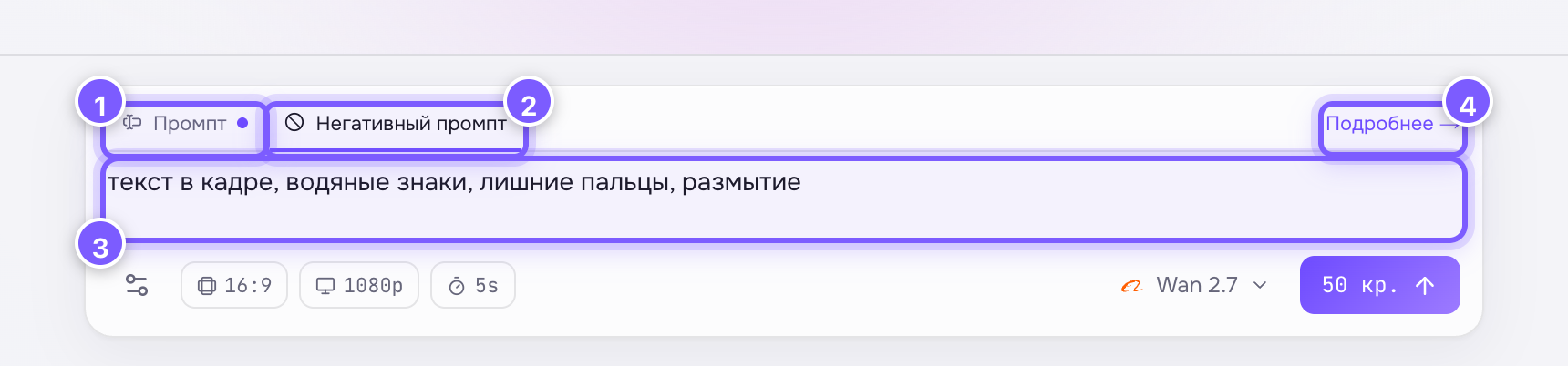
- The "Prompt" tab — what should be in the frame. The dot means it already has text.
- The "Negative prompt" tab — currently open.
- The field for the list of what must not appear. Separate items with commas.
- "Learn more" — a link to this article.
Where to find it
The negative prompt is the second tab above the input field in Studio. The tabs only appear on models that support it: Wan, Imagen, Ideogram, Qwen and Kling 2.5 Turbo. No tabs means the model has no negative prompt, and you have to get the same effect with words in the regular prompt.
Typical negative prompts
blur, low quality, artifacts— against technical defectstext, watermarks, captions— against random writingextra fingers, deformed hands— a classic for people in framecamera shake— for video
When you need it
Use it as a precision tool: generate → spot a problem → add it to the negative prompt → regenerate. Starting with a long "just in case" list isn't worth it — it can constrain the model and flatten the result.