Soul Moodboard: style from your own images
Editors2 min read
A moodboard is a board of images that set a mood. You bring 2–14 of them, write WHAT to draw, and the model draws it in the shared style of the whole board.
Open the editor: Soul Moodboard
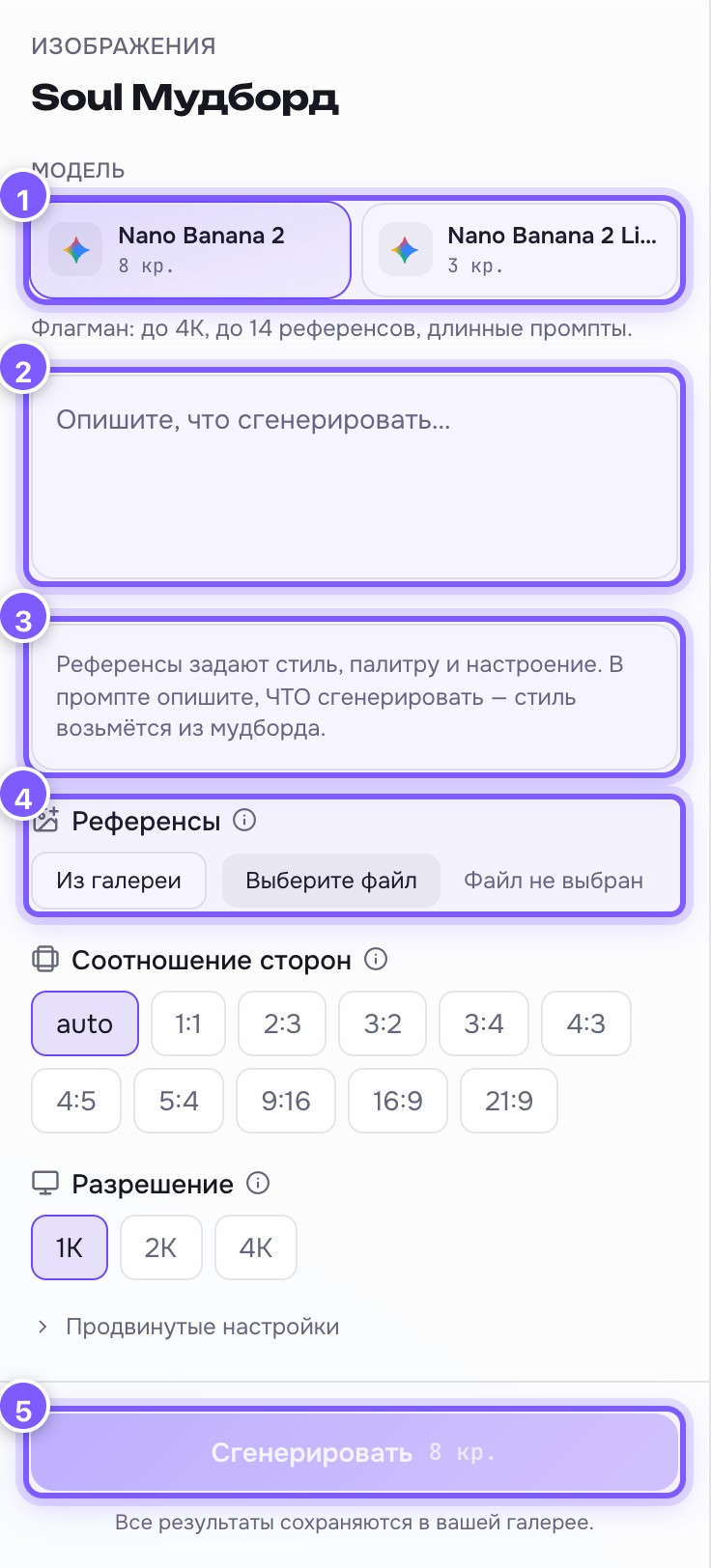
- Model — Nano Banana 2 (up to 14 references) or 2 Lite (up to 10, cheaper).
- Prompt field — what to generate: "a cup of coffee on a table", "a concert poster". No need to describe the style.
- Hint — a reminder: references set the style, the prompt sets the content.
- References — the moodboard images themselves. Without them the button stays off.
- Generate — run it.
How it works
The editor appends a tail to your text: "match the unified style, colour palette, lighting and mood of ALL reference images combined". So the images on the board should feel alike — otherwise there is no single style to extract.
Building a good moodboard
- 2–14 images, not one: with a single image the model will simply copy it.
- All of them about one mood: one palette, one kind of light, one texture.
- Do not mix photos and cartoons unless you want an odd hybrid.
- References can come from your own gallery — you do not have to upload files.
How it differs from plain references
A plain reference says "take this person or object from here". A moodboard says "take only the mood from here, and draw something else".