Prompt enhancement
Settings2 min read
You write "a cat on a windowsill". The model expands it itself: "a ginger cat sits on a wooden windowsill, soft morning light, blurred background, detailed fur". The image is drawn from that expanded text.
Try it on: Ideogram V3 · Ideogram V3 Remix · Qwen3 Pro
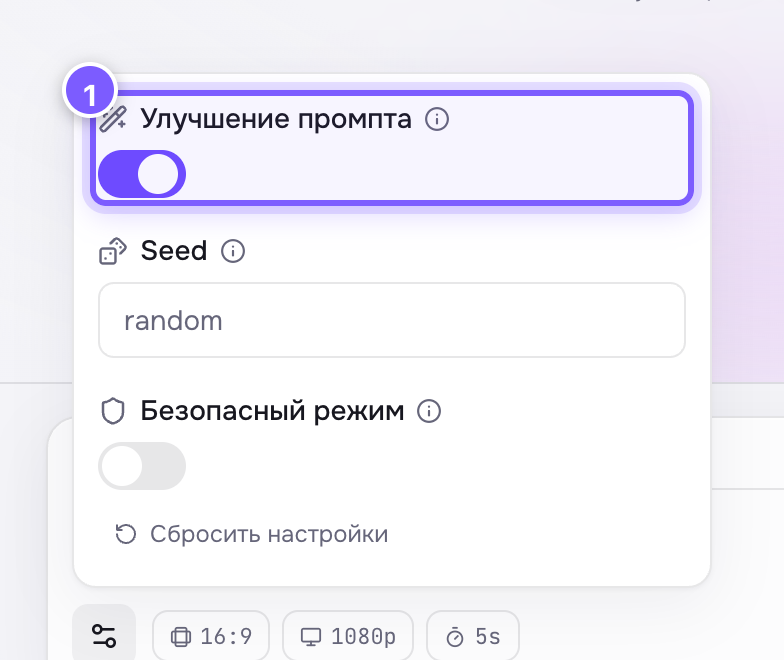
- A toggle. On by default on Wan and Qwen.
Where to find it
- Prompt enhancement — on Qwen3 Pro and the Wan 2.7 models, where it is on by default.
- Prompt expansion — on Ideogram V3, where it is off by default.
Both live under Advanced settings.
When to turn it on
- Your prompt is two or three words long.
- You do not know what else to add and just want it to look good.
- You are new to this — results are almost always nicer with it on.
When to turn it off
- Your prompt is long and precise: you set the light, the angle, the style. Expansion will argue with you and add things you did not ask for.
- You are iterating with a fixed seed: expansion writes new text each time, so the frame can never be reproduced.
- You need exactly the frame you described — a client mockup, for example.
Simple rule
Writing short — turn it on. Writing in detail — turn it off.