Upscale and background removal
Editors1 min read
Two tools that need no prompt at all: upload an image and press the button.
Open the editor: Upscale
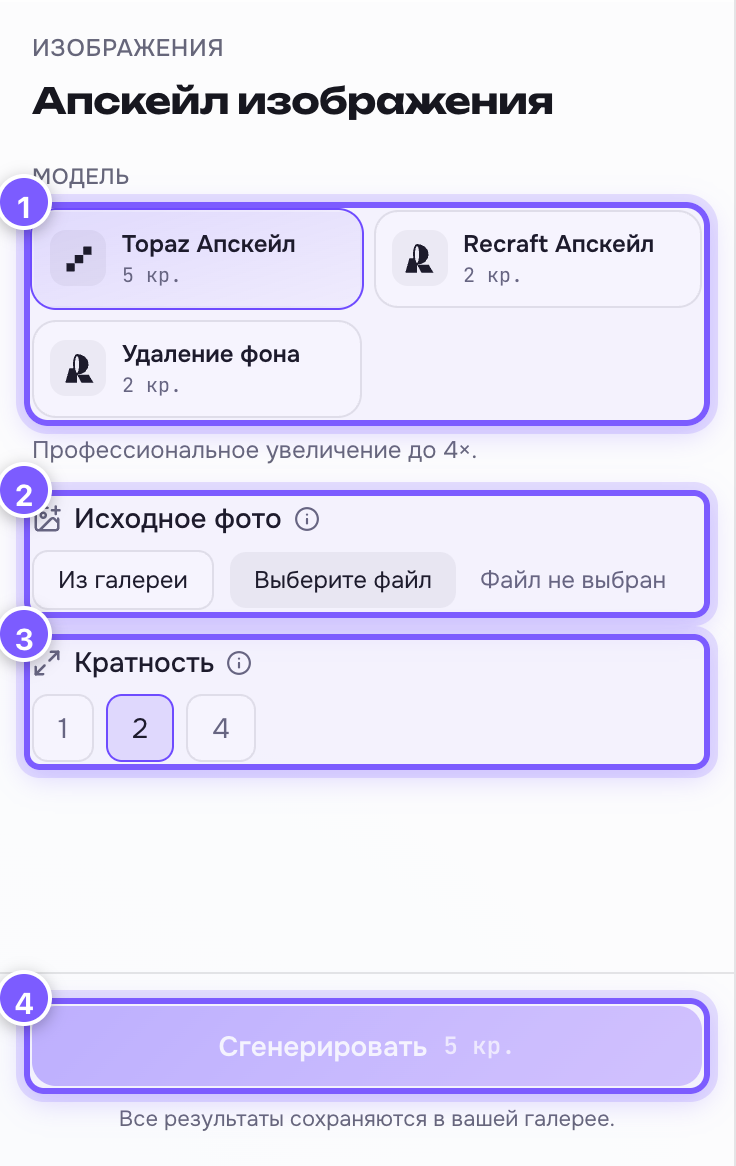
- Tool. Three of them:
- Topaz Upscale (5 cr.) — professional enlargement, the best quality.
- Recraft Upscale (2 cr.) — the cheap, quick option.
- Background removal (2 cr.) — cuts out the subject, the background becomes transparent.
- Source photo — drop a file or press "Choose file". You can also pick an image from your gallery.
- Scale — how much to enlarge: 1, 2 or 4. Topaz only. See Upscale factor.
- Generate — run it.
What upscaling really is
A small image is few dots. Upscaling paints in the missing dots so the image gets big and stays sharp. Plain stretching in an image editor gives you mush — upscaling does not.
What to pick
- Print, big screen, an old photo — Topaz, scale 4.
- Just "a bit sharper" for social media — Recraft.
- A product on white, a sticker, a collage — Background removal.
The result
Shown as a before/after slider, so you can see exactly what changed. Download it with the button below.