Image resolution: 1K, 2K, 4K
Settings2 min read
Resolution is how many dots the image has. More dots mean a bigger file and more visible detail — and a higher price.
Try it on: Nano Banana 2 · Flux 2 Pro · GPT Image 2
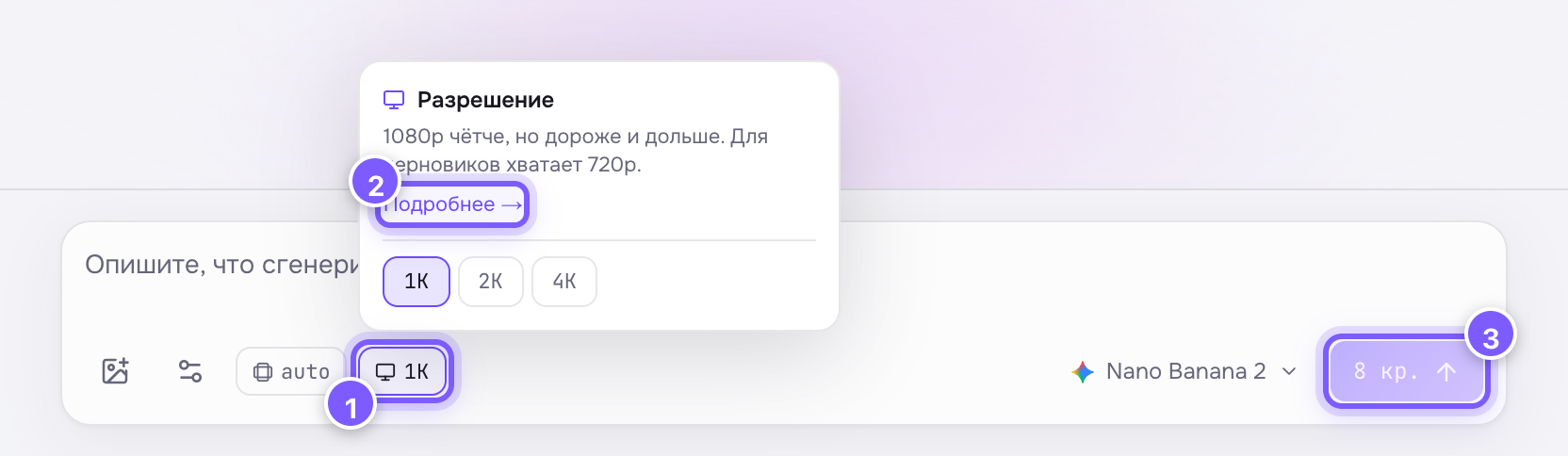
- The chip with the current value — click it to choose.
- "Learn more" — a link to this article.
- The price on the button updates instantly.
| Value | Rough size | Good for |
|---|---|---|
| 1K | ~1024 px on the long side | Social media, drafts, previews |
| 2K | ~2048 px | Websites, slides, A5 print |
| 4K | ~4096 px | Large print, banners, covers |
What it does to the price
It depends on the model. On Nano Banana 2 the price is multiplied: 1K is the base, 2K costs 1.5×, 4K costs 2×. On GPT Image 2, Flux and Qwen resolution does not affect the price at all.
You never have to guess: the current price is always on the Generate button and updates the moment you switch values.
How to choose
- Still exploring? Iterate in 1K — cheap and fast.
- Found a keeper? Rerun it in 4K: same prompt, same seed, higher resolution.
- Do not print 1K — the dots will show on paper.
Not the same as aspect ratio
Resolution is how many dots. Aspect ratio is the shape of the frame. They are independent: a 9:16 vertical frame can be either 1K or 4K.
Video models use the same name with different values — 480p, 720p, 1080p. See Video resolution.