Grok Imagine: images and video by xAI
Models1 min read
Three tools in one family: image from text, video from text, and photo animation. What sets them apart is attitude — Grok draws bolder and livelier than the rest.
Open in Studio: Grok Images · Grok Video · Grok Animate
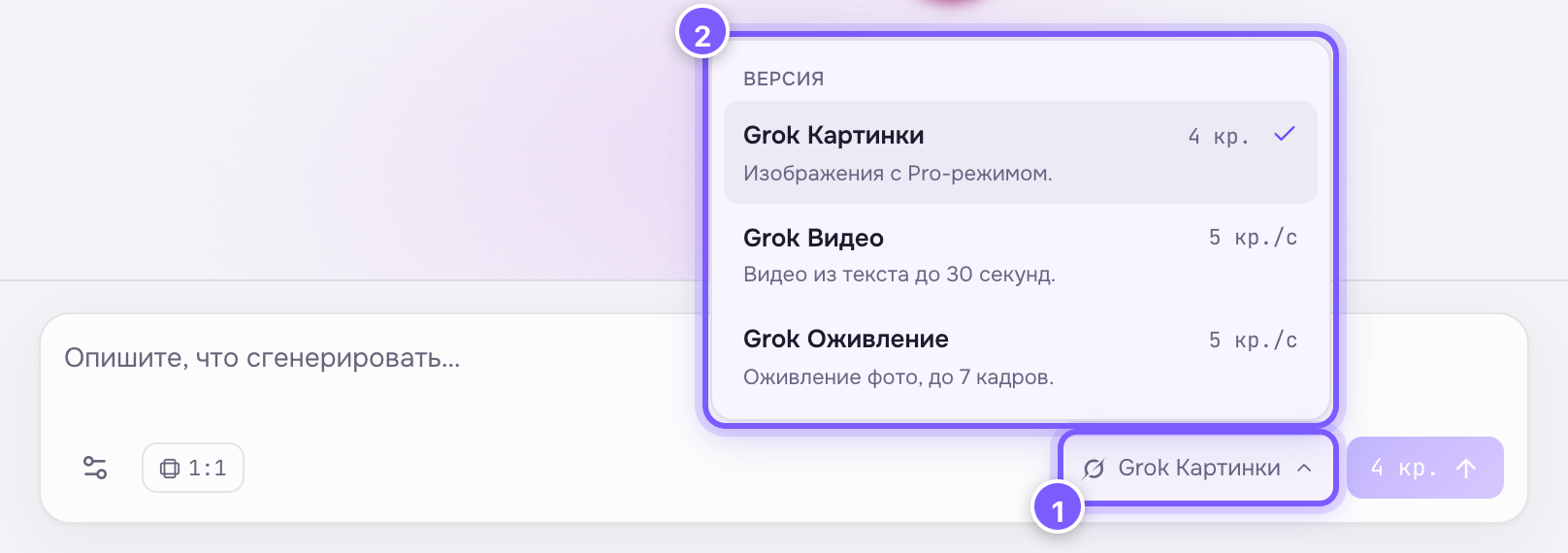
- The model-name button — click to open the list.
- Every version of the family with its price; the tick marks the current one.
| Version | Price | What it does |
|---|---|---|
| Grok Images | 4 cr. | Image from text, has a Pro mode |
| Grok Video | 5 cr./s | Video from text, up to 30 seconds |
| Grok Animate | 5 cr./s | Video from photos, up to 7 input frames |
When to pick it
- You need a long clip: up to 30 seconds, one of the largest limits in the catalogue.
- You want a lively, informal tone: memes, humour, bold subjects.
- You need a cheap image — 4 credits per frame.
Special settings
About video pricing
Video is billed per second: a 10-second clip costs 50 credits. The button price updates as you move the duration.