Face swap
Editors1 min read
Take two photos: the first is the scene (pose, clothes, background), the second is the face. The model puts the second face into the first scene.
Open the editor: Face swap
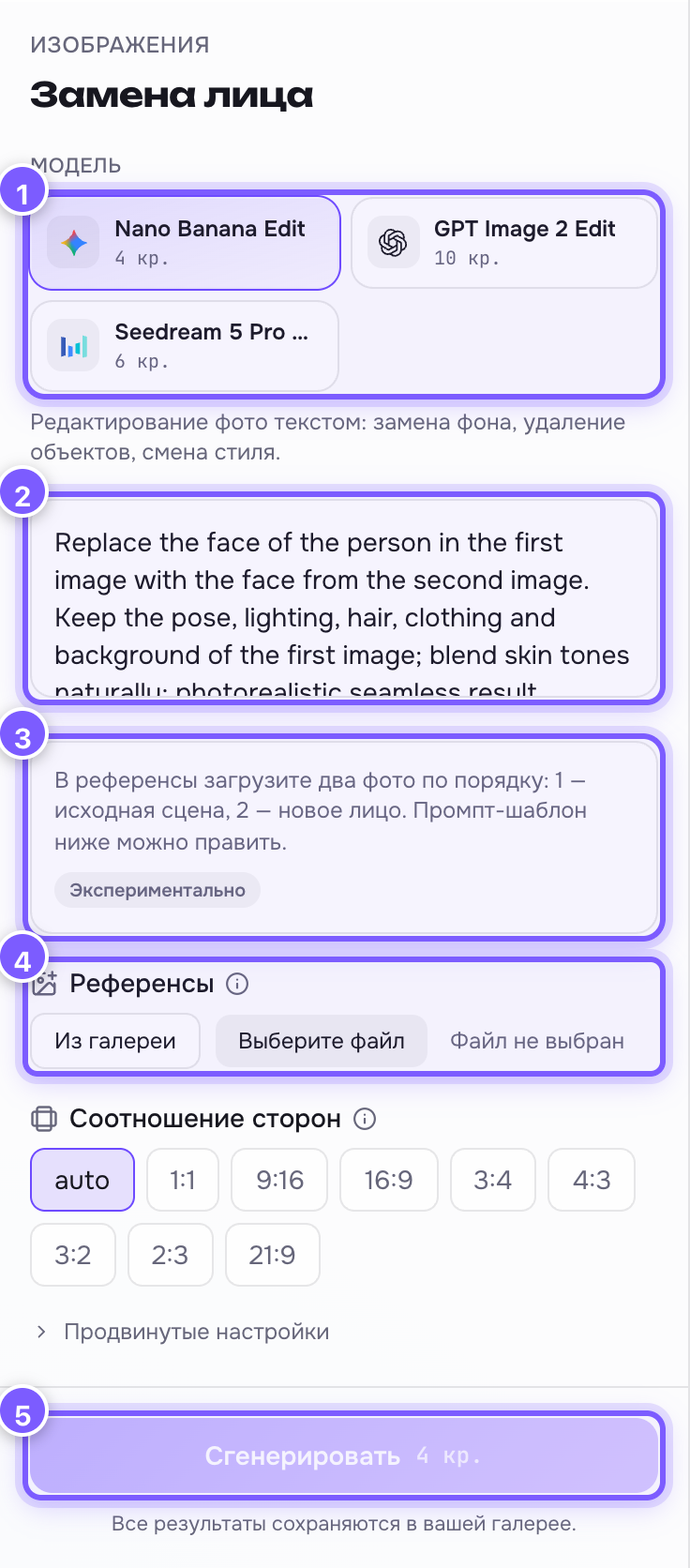
- Model — an image editing network. Nano Banana Edit is the cheapest; GPT Image 2 Edit is more careful with details.
- Prompt field — pre-filled with an English template. Models follow it more reliably than Russian text. You can edit it.
- Hint and the "Experimental" tag — we have no dedicated face-swap model; a general image editor does the job, so it may take a few tries.
- References — both photos go here. Order matters: first the scene, second the face.
- Generate — run it.
Uploading two photos in order
Press "Choose file" and add the scene shot first, then the face shot. Uploaded images show as thumbnails; the cross on a thumbnail removes it so you can upload again.
What helps
- The face in the second photo should be large, front-facing and well lit.
- Use a similar head angle in both: if the scene shows a profile, give a profile too.
- Not working? Press Generate again — every run gives a new variant.
A fair warning
Do not do this with other people's photos without their permission. Beyond being unpleasant, in many countries it is illegal.