Photodump: a series in one click
Editors2 min read
A photodump is a batch of "casual" photos in one style, the kind people post on social media. You pick an aesthetic and a frame count; the editor builds the series itself: a portrait, a shot in motion, a detail, a mirror selfie.
Open the editor: Photodump
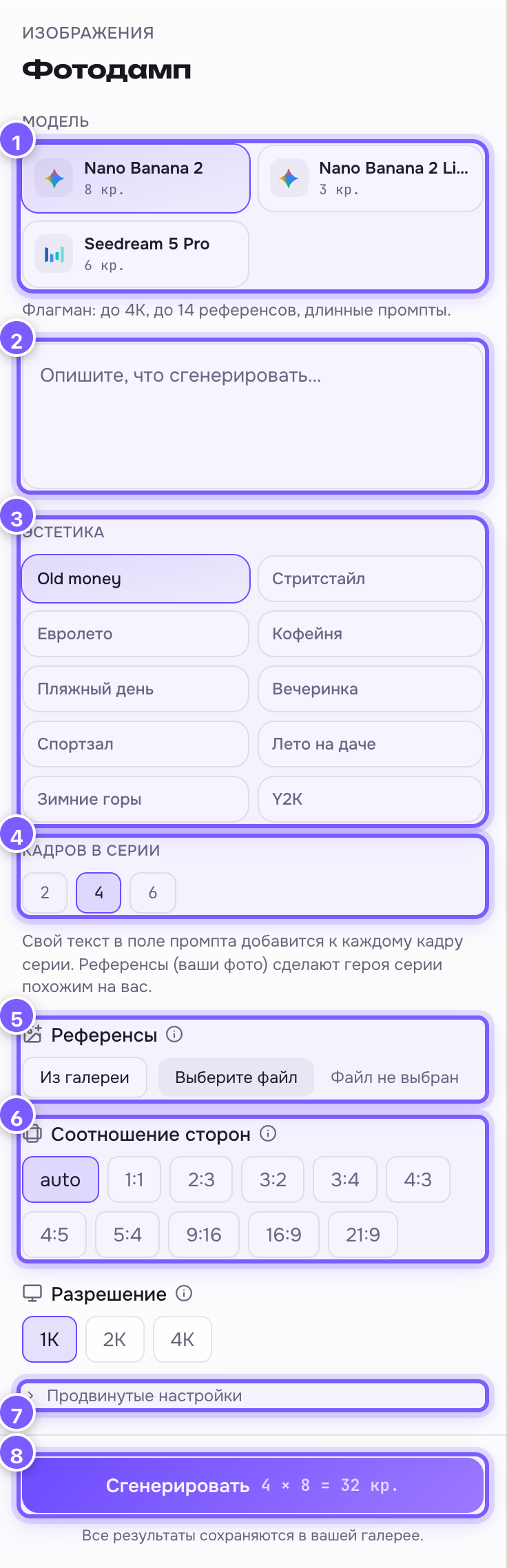
- Model — Nano Banana 2 (best at holding a face from references), 2 Lite (cheaper) or Seedream 5 Pro.
- Prompt field — optional. Your text is added to every frame of the series.
- Aesthetic — 10 ready styles: Old money, Street style, Euro summer, Coffee shop, Beach day, Night out, Gym, Cottage summer, Winter Alps, Y2K.
- Frames in the series — 2, 4 or 6. The price multiplies: 4 frames × 8 credits = 32 credits, shown right on the button.
- References — your own photos. Upload 3–5 and the hero of the series will look like you.
- Aspect ratio and the model's other parameters — as in any editor.
- Advanced settings — rare parameters under this row.
- Generate — launches the whole series at once.
How the series is built
One click runs several generations in a row. Each takes your aesthetic and adds its own "scene": a close portrait, a shot mid-walk, a shallow-focus detail, a mirror selfie, a wide shot, a flash photo. That is why the series looks alive instead of six identical pictures.
Tips
- Want the series to be about you? Upload references. Without them you get a stranger in the right style.
- Vary the references: front, profile, with an expression.
- Your own text can pin details: "in a white sweater, with a ginger dog".
- Start with 2 frames to check the style, then go for 6.